VM Ware Testbeitrag
Erstellt am 15.04.2025 um 16:52:38 Uhr | muellda
Aktualisiert am 15.04.2025 um 16:52:38 Uhr | muellda
VM Ware ist ein neuer Teil
Erstellt am 15.04.2025 um 16:52:38 Uhr | muellda
Aktualisiert am 15.04.2025 um 16:52:38 Uhr | muellda
VM Ware ist ein neuer Teil
Erstellt am 14.04.2025 um 11:49:06 Uhr | muellda
Aktualisiert am 14.04.2025 um 11:49:06 Uhr | muellda
Plesk on Ubuntu 20.04/Ubuntu 22.04
By default, Ubuntu 20.04 is shipped with MariaDB 10.3 and Ubuntu 22.04 with MariaDB 10.6.
MYSQL_PWD=`cat /etc/psa/.psa.shadow` mysqldump -u admin –verbose –all-databases –routines –triggers > /tmp/all-databases.sql
Stop MariaDB:
Here is an example for MariaDB 10.4:
Warning: MariaDB 10.4 and later versions are supported since 18.0.30, make sure the latest Plesk version is installed.
apt-get install software-properties-common
apt-key adv –fetch-keys ‚https://mariadb.org/mariadb_release_signing_key.asc‘
curl -LsS https://r.mariadb.com/downloads/mariadb_repo_setup | sudo bash -s — –mariadb-server-version=10.4
Create a backup of all MySQL data:
cp -v -a /var/lib/mysql/ /var/lib/mysql_backup
Start an upgrade with the following command. Leave all fields empty when asked for a ‚root‘ user password:
apt-get update
apt-get install mariadb-server
Adjust the my.cnf configuration file to match the new requirements:
sed -i ’s/bind-address = ::ffff:127.0.0.1/bind-address = 127.0.0.1/g‘ /etc/mysql/my.cnf
Start the MariaDB service:
service mariadb start
Upgrade MySQL/MariaDB databases:
MYSQL_PWD=`cat /etc/psa/.psa.shadow` mysql_upgrade -uadmin
Restart mysql service:
service mariadb restart
Execute the following commands to update package version inside Plesk:plesk bin service_node –update local
More information available in MySQL documentation at http://dev.mysql.com/.
Erstellt am 05.04.2025 um 21:38:21 Uhr | muellda
Aktualisiert am 05.04.2025 um 21:38:21 Uhr | muellda
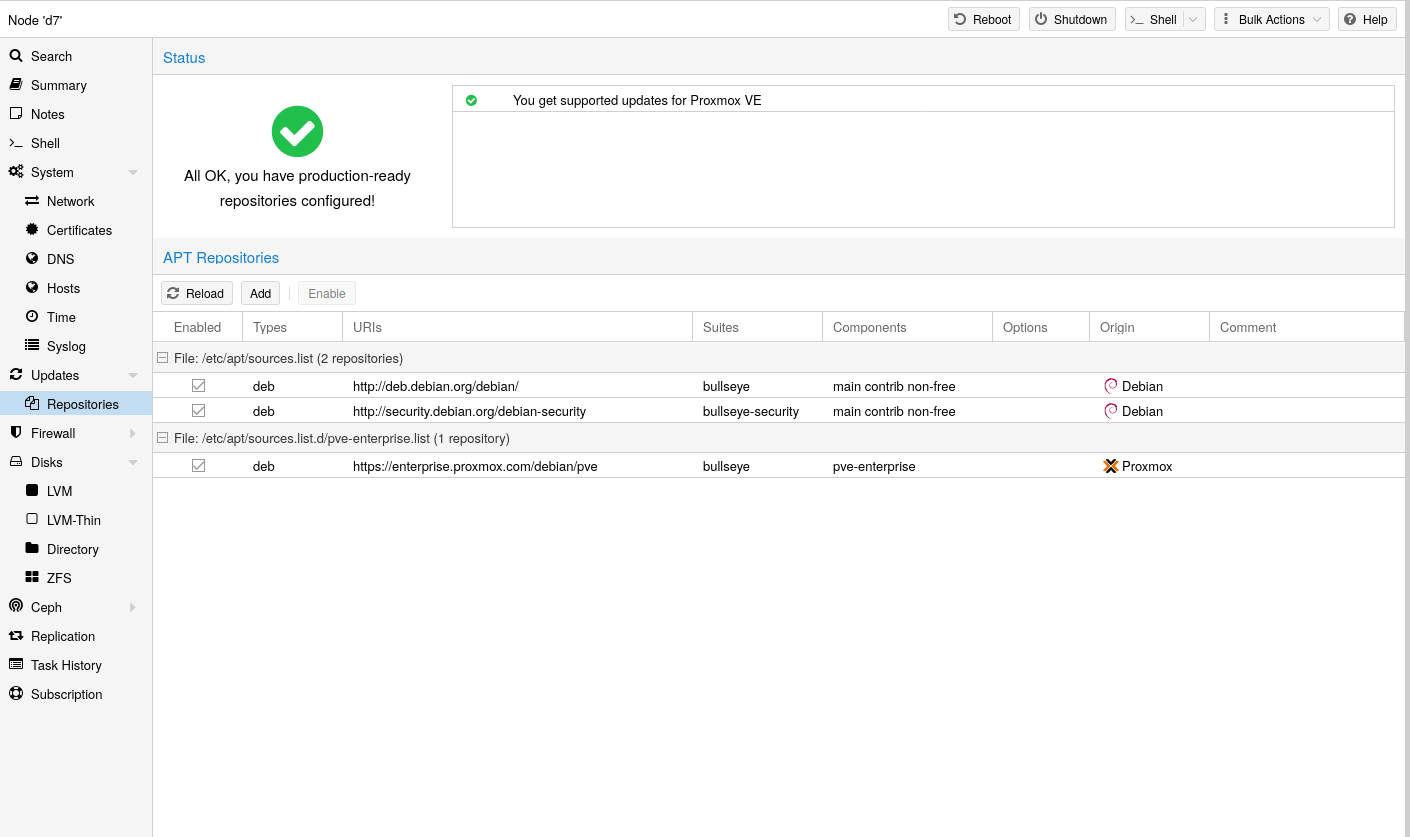
Um kostenlose Updates zu erhalten, muss man die Enterprise-Repository (2 Dateien in Updates) deaktivieren und No-Subscription hinzufügen.
Danach können in der Shell Updates ausgeführt werden:
apt update && apt upgrade -y && apt autoremove -y
No-Subscription-Meldung entfernen Datei anlegen:
nano /etc/apt/apt.conf.d/pve-no-subscription-message
Folgenden Inhalt einfügen:
DPkg::Post-Invoke { "dpkg -V proxmox-widget-toolkit | grep -q '/proxmoxlib\.js$'; if [ $? -eq 1 ]; then { echo 'Removing subscription message from UI...'; sed -i -e '/data.status/{s/!//;s/Active/NoMoreSubMessage/i}' -e 's#(-no-subscription|test)#(test)#' -e '/if (repos.nosubscription)/{n;s/addWarn/addGood/}' -e 's/All OK, you have production-ready repositories configured!/All OK, you have no-subscription repositories configured!/' /usr/share/javascript/proxmox-widget-toolkit/proxmoxlib.js; }; fi"; };
apt install --reinstall proxmox-widget-toolkit
pve neu starten!
Proxmox VE uses APT as its package management tool like any other Debian-based system.
Proxmox VE automatically checks for package updates on a daily basis. The root@pam user is notified via email about available updates. From the GUI, the Changelog button can be used to see more details about an selected update.
Repositories are a collection of software packages, they can be used to install new software, but are also important to get new updates.
| You need valid Debian and Proxmox repositories to get the latest security updates, bug fixes and new features. |
APT Repositories are defined in the file /etc/apt/sources.list and in .list files placed in /etc/apt/sources.list.d/.
Since Proxmox VE 7, you can check the repository state in the web interface. The node summary panel shows a high level status overview, while the separate Repository panel shows in-depth status and list of all configured repositories.
Basic repository management, for example, activating or deactivating a repository, is also supported.
In a sources.list file, each line defines a package repository. The preferred source must come first. Empty lines are ignored. A # character anywhere on a line marks the remainder of that line as a comment. The available packages from a repository are acquired by running apt-get update. Updates can be installed directly using apt-get, or via the GUI (Node → Updates).
File /etc/apt/sources.list
deb http://deb.debian.org/debian bookworm main contrib
deb http://deb.debian.org/debian bookworm-updates main contrib

# security updates
deb http://security.debian.org/debian-security bookworm-security main contrib
Proxmox VE provides three different package repositories.
This is the recommended repository and available for all Proxmox VE subscription users. It contains the most stable packages and is suitable for production use. The pve-enterprise repository is enabled by default:
File /etc/apt/sources.list.d/pve-enterprise.list
deb https://enterprise.proxmox.com/debian/pve bookworm pve-enterprise
Please note that you need a valid subscription key to access the pve-enterprise repository. We offer different support levels, which you can find further details about at https://proxmox.com/en/proxmox-virtual-environment/pricing.
| You can disable this repository by commenting out the above line using a # (at the start of the line). This prevents error messages if your host does not have a subscription key. Please configure the pve-no-subscription repository in that case. |
As the name suggests, you do not need a subscription key to access this repository. It can be used for testing and non-production use. It’s not recommended to use this on production servers, as these packages are not always as heavily tested and validated.
We recommend to configure this repository in /etc/apt/sources.list.
File /etc/apt/sources.list
deb http://ftp.debian.org/debian bookworm main contrib
deb http://ftp.debian.org/debian bookworm-updates main contrib

# Proxmox VE pve-no-subscription repository provided by proxmox.com,
# NOT recommended for production use
deb http://download.proxmox.com/debian/pve bookworm pve-no-subscription

# security updates
deb http://security.debian.org/debian-security bookworm-security main contrib
This repository contains the latest packages and is primarily used by developers to test new features. To configure it, add the following line to /etc/apt/sources.list:
sources.list entry for pvetest
deb http://download.proxmox.com/debian/pve bookworm pvetest
| The pvetest repository should (as the name implies) only be used for testing new features or bug fixes. |
This repository holds the enterprise Proxmox VE Ceph 19.2 Squid packages. They are suitable for production. Use this repository if you run the Ceph client or a full Ceph cluster on Proxmox VE.
File /etc/apt/sources.list.d/ceph.list
deb https://enterprise.proxmox.com/debian/ceph-squid bookworm enterprise
This Ceph repository contains the Ceph 19.2 Squid packages before they are moved to the enterprise repository and after they where on the test repository.
| It’s recommended to use the enterprise repository for production machines. |
File /etc/apt/sources.list.d/ceph.list
deb http://download.proxmox.com/debian/ceph-squid bookworm no-subscription
This Ceph repository contains the Ceph 19.2 Squid packages before they are moved to the main repository. It is used to test new Ceph releases on Proxmox VE.
File /etc/apt/sources.list.d/ceph.list
deb http://download.proxmox.com/debian/ceph-squid bookworm test
This repository holds the enterprise Proxmox VE Ceph 18.2 Reef packages. They are suitable for production. Use this repository if you run the Ceph client or a full Ceph cluster on Proxmox VE.
File /etc/apt/sources.list.d/ceph.list
deb https://enterprise.proxmox.com/debian/ceph-reef bookworm enterprise
This Ceph repository contains the Ceph 18.2 Reef packages before they are moved to the enterprise repository and after they where on the test repository.
| It’s recommended to use the enterprise repository for production machines. |
File /etc/apt/sources.list.d/ceph.list
deb http://download.proxmox.com/debian/ceph-reef bookworm no-subscription
This Ceph repository contains the Ceph 18.2 Reef packages before they are moved to the main repository. It is used to test new Ceph releases on Proxmox VE.
File /etc/apt/sources.list.d/ceph.list
deb http://download.proxmox.com/debian/ceph-reef bookworm test
This repository holds the enterprise Proxmox VE Ceph Quincy packages. They are suitable for production. Use this repository if you run the Ceph client or a full Ceph cluster on Proxmox VE.
File /etc/apt/sources.list.d/ceph.list
deb https://enterprise.proxmox.com/debian/ceph-quincy bookworm enterprise
This Ceph repository contains the Ceph Quincy packages before they are moved to the enterprise repository and after they where on the test repository.
| It’s recommended to use the enterprise repository for production machines. |
File /etc/apt/sources.list.d/ceph.list
deb http://download.proxmox.com/debian/ceph-quincy bookworm no-subscription
This Ceph repository contains the Ceph Quincy packages before they are moved to the main repository. It is used to test new Ceph releases on Proxmox VE.
File /etc/apt/sources.list.d/ceph.list
deb http://download.proxmox.com/debian/ceph-quincy bookworm test